About a year ago (see this blog post and this Indology post), Skrutable added an interface to Google Cloud Vision for converting PDFs to plain-text with OCR, abstracting away the coding and most other technical interaction with Google Cloud infrastructure. The idea was to make this relatively high-performance OCR engine more available to my fellow Sanskrit people who are not comfortable doing the necessary tech setup themselves. It has seen modest use since then — certainly not the main game in town.
Of the other options also in use, on the low end, there are familiar free and/or user-friendly options, including Google Drive (e.g. via ocr.sanskritdictionary.com), ABBYY FineReader, Tesseract (this last one is a model with various interfaces), and even (I have heard?) Google Translate. I'm sure some people toss things into ChatGPT and Claude, too, but my own experience is that those are also on the low-end. On the higher end, also available for about a year now (see this Indology post), Dharmamitra offers an excellent, free, drag-and-drop interface that gets a Gemini Flash LLM (currently 2.5) to do OCR under strict prompt constraints. And more recently, some new players have entered the scene. Surya and Sarvam have my attention at the moment.
Note: When I looked about two months ago, Surya did not have a practical interface option that would enable access for everyday users. But Surya released another update a month ago which I think did just that, and that could theoretically make it a real contender. I'll need more time to assess.
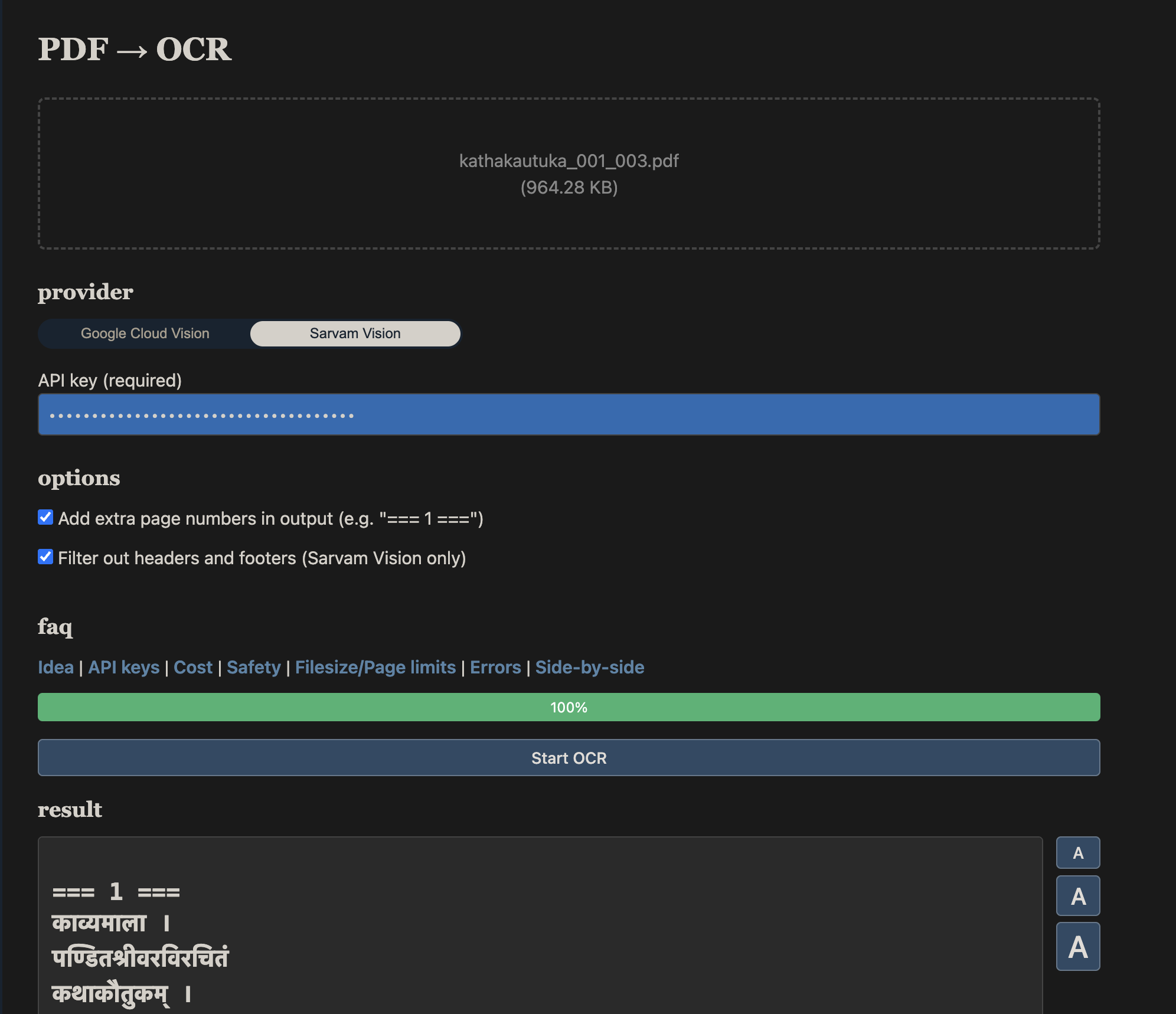
For its part, Sarvam is proving to be very interesting indeed. Sarvam AI, based in Bengaluru, is building AI infrastructure with a specific focus on South Asian languages. Their OCR system, Sarvam Vision, has the same interface pattern as Google Cloud Vision: use code to talk to the API, send in a PDF, get back text. I tested it, and I was impressed — so much so, that I immediately went ahead and added it to Skrutable as a second OCR option. You can go ahead and use it right now on Skrutable's OCR page.
In a word: This is the best Sanskrit OCR I have seen so far. And you can get started using it today if you want.
What you do vs. what Skrutable handles
In short, just like before, you go to the page, drop in your PDF, provide an API key, and click go. Skrutable takes care of the rest and gives you the plain-text result.
To get that Sarvam API key, you still have to do a little billing setup, but it's fortunately a little simpler than with Google. You simply create an account at sarvam.ai, link a credit card*, generate a key, and you're in. (See instructions on Skrutable's OCR FAQ page.) No cloud project, no separate API library to enable.
* One major kink is that transactions are in INR through RazorPay, which you may need to clear with your bank first if you do not live in India, to avoid being declined for fraud concerns. Also, once your promotional credits are used up, you must pre-pay, either with one-off top-ups or auto-refresh at a threshold, as opposed to post-paying at the end of the month as Google does for Cloud Vision.
As it happens, Sarvam's API accepts at most ten pages per request, which is a hard limit on their end. But Skrutable has got you covered. You just submit your large PDF, and Skrutable splits it into ten-page chunks, sends it to Sarvam in sequence, and reassembles the result with correct page numbering. Results stream into the page as each chunk completes, so for a long document you watch gradual progress in real time rather than stare at a spinner.
More gory detail: Another thing Skrutable is absorbing on the user's behalf is output format parsing. The Sarvam API returns its OCR output as Markdown text embedded in per-page JSON files, packaged inside a ZIP archive. Skrutable figures that all out and gives you a plain .txt file. If you're concerned about Skrutable being in the middle, go ahead and look at the open-source code to see how it's done.
Prompted model vs. dedicated engine
Before I get into fun details comparing Sarvam Vision and Google Cloud Vision, which are comparable systems, I'd like to make a few observations about Dharmamitra's Gemini setup, which is of a different sort entirely.
Whereas both Sarvam Vision and Google Cloud Vision use dedicated document OCR models, the Gemini class of large language models (LLMs) is vastly broader in its range of powers, and so Dharmamitra uses a special prompt for the specific task of transcription. (As it happens, the exact prompt used is kept as a secret sauce, not open-source. 😉) And as any user of the Dharmamitra setup already knows, LLMs do certainly bring real capability to this kind of work. However, they also bring hallucinatory failure modes that dedicated OCR engines for the most part just don't have. Sometimes, that is, it's just a little too creative in its readings, based on what you could call an excess of linguistic understanding and confidence.
Another point of concern is that commercial LLMs are regularly repriced and/or deprecated to make way for new models, meaning that Dharmamitra's OCR behavior might change in unpredictable ways. Indeed, the underlying model recently changed silently from Gemini 2.0 to 2.5, and the lack of apparent improvement in the more recent 3.0 and 3.5 models for Sanskrit text work — in my experience and that of some other Sanskrit-tech people I talk to — does not inspire confidence that the Google LLM team cares much to avoid performance degradation in this extremely niche use case. This stands in contrast to Google Cloud Vision which has an incentive to remain a consistent solution for OCR specifically; time will tell whether Sarvam AI has any staying power.
And of course, Dharmamitra's users pay nothing, thanks to grant funding. So good! I don't have any specific reason to doubt that the system will continue to be available and maintained as a very useful option, hopefully for free in perpetuity. But especially given the differences in the nature of the model and how it is served to consumers, I personally prefer to interact directly with dedicated systems and foot the bill myself, all other things being equal.
Really though, it comes down to performance. First, you want a low character error rate. Second, as a humanist, you want trust; imagine that the system does not transcribe diplomatically but instead tries to "improve" the text with creative emendations (yeesh). And third, there's the issue of sensitivity to South Asian documents and their issues, like diacritics, traditional typefaces, and multi-column book layouts. For its part, Google Cloud Vision basically can't do multiple columns without jumbling them together, as if that scenario is a total afterthought, while anecdotally I can affirm that Sarvam has done brilliantly well at it in a few tests I've done. How refreshing.
For now, I haven't been able to go so far as to include the Dharmamitra/Gemini setup in my detailed comparative assessment (below). If I'm going to do that, I want to be more rigorous and thorough, and do it on more tools at the same time. That would be a full paper, I think. What I do have now, since they're similar in nature and both offered through Skrutable, is a comparison of Google Cloud Vision and Sarvam Vision.
GCV vs. Sarvam: a clear CER difference, and the whitespace finding
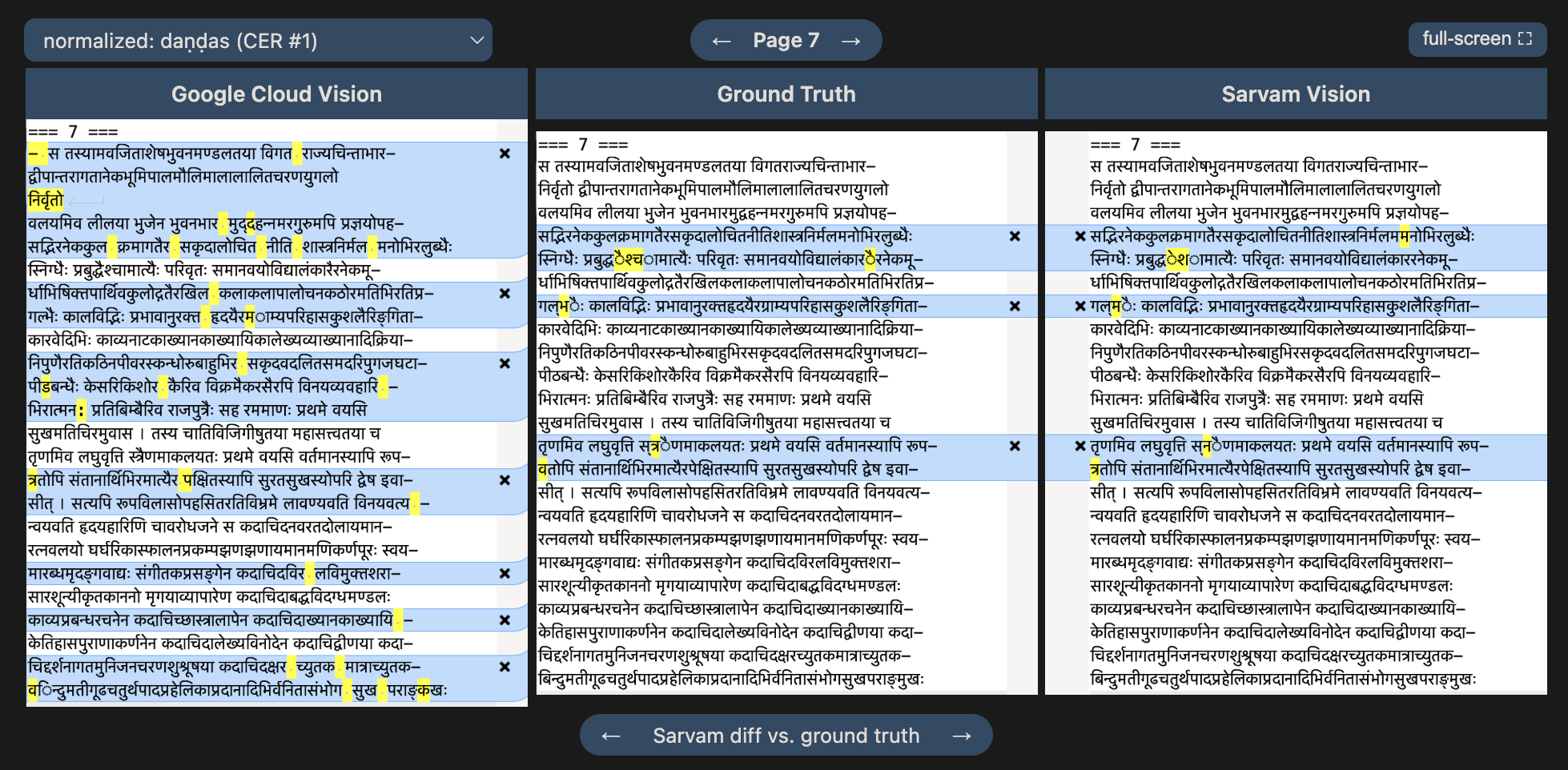
To give potential users an immediate and detailed sense of what Sarvam Vision is capable of relative to Cloud Vision, I've prepared a fun little side-by-side comparison on Skrutable's OCR FAQ page. In it, I run three pages of Bāṇa's Kādambarī (Peterson 1889) through both engines and score the output against a hand-corrected ground truth, showing with clear visuals all the relevant differences. Being experienced in using OCR results for Sanskrit text digitization, I focused this comparison on stuff that actually matters in manual cleaning, namely, the non-trivial aspects that can only be caught by proofreading page by page, character by character. The result is summarized with a combination of categorical observations and standard character error rate (CER). The latter essentially measures edit distance, or how many changes (additions, deletions, modifications) it would take to get to the ground truth.
Here's the headline:
| Engine | CER | Spurious whitespaces | CER (after whitespaces normalized) | CER (after misplaced word restored) |
|---|---|---|---|---|
| Cloud Vision | 2.85% | 45 | 1.69% | 1.21% |
| Sarvam Vision | 0.95% | 1 | 0.92% | 0.92% |
In other words, GCV gets nearly 3% of non-trivial characters wrong, while Sarvam gets about 1%. That is a real gap. The additional CER calculations serve to illustrate that, of the 1.9% difference, about 60% of it comes down to spurious whitespace. To explain: Sanskrit typography, especially in older editions, occasionally has small gaps between syllables within a word, and Cloud Vision has the unfortunate tendency to read these as word boundaries, inserting spaces that aren't there. The result is incorrect Sanskrit, which takes manual work to correct. Similarly, a word misplaced onto a different line by GCV hits the CER calculation hard (another 25% of the 1.9% difference), but again, there's no easy fix for that outside of manual proofreading. So the 2% CER gap stands as meaningful, even though the akṣara-level reading differences are surprisingly few, comprising the mere 0.3% remaining difference in CER.
And remember, if you're dealing with multi-column layouts as found in many printed Sanskrit editions, there's not even any point in considering something like CER when GCV simply has no concept of columns, leading to the GCV output being a total mess, unless you employ the workaround of cropping pages down to single columns before OCR-ing — but that cost in your time has to be considered, too. Just watch Sarvam handle columnar layouts more or less correctly (I've seen occasional mistakes) and produce clean, uninterrupted prose with virtually no spurious spaces. Wow.
As for the more trivial differences which do not factor into the CER calculation: Sarvam also reads daṇḍas more reliably (Cloud Vision renders most ।'s and ॥'s as vertical bars or "pipes") and understands headers and footers well enough to optionally filter them out for you, which Skrutable exposes as an extra option. For its part, Cloud Vision handles marginal numbers better.
Despite the discussion here being quantitative, this is all still just an anecdotal illustration, nothing like a real benchmark. I've also seen Sarvam's performance be less stunningly better than GCV. But I think we have real reason to trust the direction of improvement suggested here. For the kind of material many Sanskrit scholars actually want to digitize — clean Devanāgarī print, often in multi-column layout — Sarvam just seems clearly better so far.
People will surely be curious to hear whether Sarvam can also handle handwritten manuscripts. In my anecdotal experience: No, not yet, unfortunately. What about more complicated multi-column layouts, poor-quality scans, scripts other than Devanāgarī, etc.? All good questions! Rather than wait until I can do all possible comparisons myself, I'm putting these helper tools out there, so that we can work on figuring it out together. For now, for me personally, I've seen enough to want this to be my go-to option for the foreseeable future, with Cloud Vision and Dharmamitra's prompted Gemini as second and third choices, respectively.
Cost
Cloud Vision charges $1.50 per 1,000 pages, after a free monthly allowance of 1,000 pages. Sarvam charges ₹0.50 per page, or $5.23 per 1,000 pages at today's exchange rate. That is close to four times more expensive, but to my mind, the cleaner output represents a significant savings of manual post-processing labor, which is worth it to me.
To make things extra clear, I've added a simple cost calculator on Skrutable for each provider.

I want users to know exactly what it's going to cost before they submit the job. To ensure that, I've also reinforced the cost calculator with automatic checks of the providers' pricing pages, so I'll know if the cost calculator needs updating. (The rupees-to-dollar conversion rate is easily updated in real-time.) What I really don't want is users getting charged more than they expected for months at a time because pricing silently changed on the providers' end. This setup is my best attempt at providing an understandable and comfortable experience in that respect. But let me know if you run into issues.
That's it for now, let me know how it goes for you!